dBpoweramp Batch Ripper is designed to facilitate automated ripping of Audio CDs, using a single drive, right through to automated multi-drive robotic ripping. Batch Ripper™ appeals to commercial ripping houses, radio stations and enthusiasts:
- Auto & manual loading (open design, most robots supported),
- From one to many drives support,
- Process overview of each drive and ripping status,
- Highest quality metadata providers: AMG & GD3 (non-commercial access is restricted to 400 lookups in AMG, GD3 not included),
- Lowest commercial per-CD metadata rates,
- Extensive customizable meta-data rule sets,
- Over 120 discs per hour through-put, per machine (6x drives)
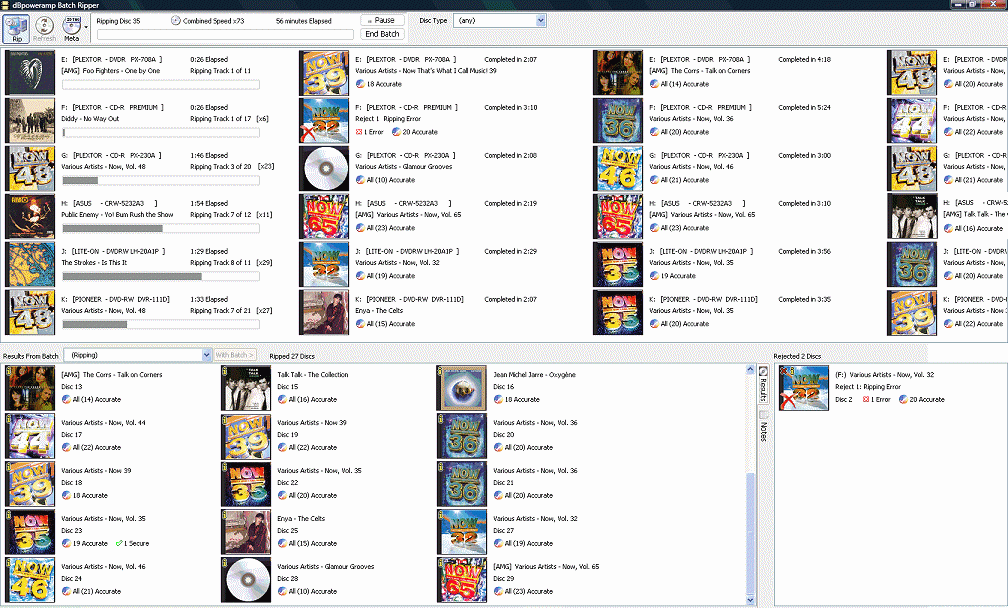
Batch Ripper can be trialled at the same time as dBpoweramp Reference and is included free of charge with dBpoweramp Reference (R13 or above, install from the link below).
Having tried most loaders, we recommend Acronova Nimbie.
Download
Installation Instructions:
1) Pre-requisite: requires dBpoweramp Reference Purchase dBpoweramp Reference
2) Install Batch Ripper R2025-04-15 32 & 64 bit included, Windows 11, 10, 7 and Vista supported
3) Auto Loader Drivers and Recommended Settings:
Nimbie Batch Ripper Driver v6
Models Supported: Nimbie, Nimbie Plus Follow setup guide
Recommended Settings: Main Page 'End After': Manual Stop. Configuration: Offer Spindle Change After 2 failed Load Attempts
Auto Eject - Manual Load [included as standard]
Recommended Settings: Main Page 'End After': Discs Ripped or Manual Stop. Configuration: Offer Spindle Change After (never)
Elite Micro Batch Ripper Driver
Models Supported: Amtren & Discmakers Elite Micro
Minicubis Batch Ripper Driver
Models Supported: MFDigital Baxter, Datatronics Minicubis, Stordigital 25, Diskmakers Pico, Acronova DupliQ
Recommended Settings: Main Page 'End After': Manual Stop. Configuration: Offer Spindle Change After 2 failed Load Attempts
Media Changer Batch Ripper Driver
Models Supported: Windows detected media changers: Sony XL1Bx, Power File
Recommended Settings: Main Page 'End After': Manual Stop. Configuration: Offer Spindle Change After (never)
Information: Disable "Removable Storage Service" if running in the services control panel, Stop it and change it from Automatic to Manual.
Primera Composer Batch Ripper Driver
Models Supported: Primera Composer
MF Digital Ripstation Batch Ripper Driver
Requires manual configuration
Primera Batch Ripper Driver R3.5
Models Supported: Xi-Series, Disc Publisher, Bravo II, BravoPro, Disc Publisher Pro, XR-Series. Dual Drive Xi2 models are not supported.
Recommended Settings: Main Page 'End After': Manual Stop. Configuration: Offer Spindle Change After 2 failed Load Attempts
Includes 2 drivers: normal and 'Kiosk' for when there are two input bins and one output (with no reject).
Important: recent reports indicate the primera driver is
no longer working with the latest Primera drivers.
Vinpower Digital Batch Ripper Driver R1
Models Supported: Ripbox, Cronus.
Recommended Settings: Main Page 'End After': 1 Failed Disc Load
Copyright © illustrate 2025, All Rights Reserved